This tab allows you to specify custom settings for merged, or multivolume help in an ePublisher AutoMap job. The tab is displayed only for output formats that support merged, or multivolume help, and its settings depend on the output format, as described in Merge Settings Window.
Specifies the name displayed in the title bar of the help system when the multivolume help system opens. 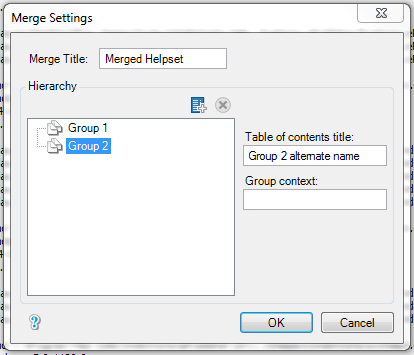
For example, if you have two or more groups, this title is displayed in the title bar of the merged help system.
Lists the top-level groups in the job and any containers you add, in the order of the table of contents for your merged, or multivolume help system. Drag a group or container to move it. Add new container adds a container named "Untitled Topic", which you can rename and drag groups or other containers onto. Delete selected container removes the selected container and any containers inside it, and moves the groups they held up to its level. Subgroups do not appear in the hierarchy. The container buttons are available only for WebWorks Reverb 2.0, WebWorks Reverb, WebWorks Help 5.0, Microsoft HTML Help 1.x, and Eclipse Help.
Specifies the name displayed for the top-level group when the top-level group is displayed in the table of contents for your merged, or multivolume help system. Change the name displayed for the top-level group in your merged, or multivolume help system by selecting a top-level group and then typing a new name in the field. By default, the name displayed is the name of the top-level group in your project.
Specifies the name to use as the topic context when you generate merged, or multivolume help that includes context-sensitive help.